
How to Use AI Agents for Trend Analysis? Real-world Use Cases
Summary
What is trend analysis and why the traditional process takes weeks
How AI agents monitor metrics, investigate causes, and act without waiting to be asked
How governed context grounds AI agents in your business logic
PUBLISHED:
UPDATED:
Agentic analytics is well past the experimental stage. Teams are already using agents to answer ad hoc questions, monitor performance, and investigate changes without routing every follow-up back through the data team. Our CDO report found that 93% of enterprise data leaders are already using or exploring AI for data and analytics, and the list of use cases keeps growing.
The question is no longer whether AI belongs in the analytics stack. It’s which tedious analytical work it can take off people’s plates. Trend analysis is one of the most obvious places to start.
Right now, diagnosing why revenue fell, churn climbed, or conversion slipped takes days or weeks. Meanwhile, the business keeps moving: revenue continues to leak, campaigns keep burning budget, and the window to correct course keeps shrinking.
Every hour you cut from that investigation is an hour the business gets back to respond. Here’s how agents close the gap.
What is trend analysis?
Trend analysis is the practice of examining historical data to spot consistent patterns, directions, and recurring movements. It answers three questions: what is changing, where that change is concentrated, and whether it’s likely to continue.
Getting those answers has always been a sequential process. Someone notices a change on a dashboard and files a request. An analyst picks it up a few days later, pulls the underlying data, compares periods, and breaks the movement down across segments. When the answer comes back, it brings three more questions with it. Was the decline concentrated in one market? Did pricing change? Was a campaign paused? That’s another week gone.
By the time the answer arrives, it describes a situation that no longer exists in quite that shape.
How can AI agents do trend analysis?
Proactive agents perform trend analysis by monitoring business metrics, identifying meaningful changes, investigating the causes, and delivering findings to whoever owns the decision — in whatever tool they already work in. It’s the same sequence an analyst would follow, compressed from weeks of manual work into minutes.
What disappears is the waiting between steps. You no longer have to bounce between dashboards, switch tools, or wait for an analyst. The agent continues the analysis, following new leads as they emerge without any handoff.
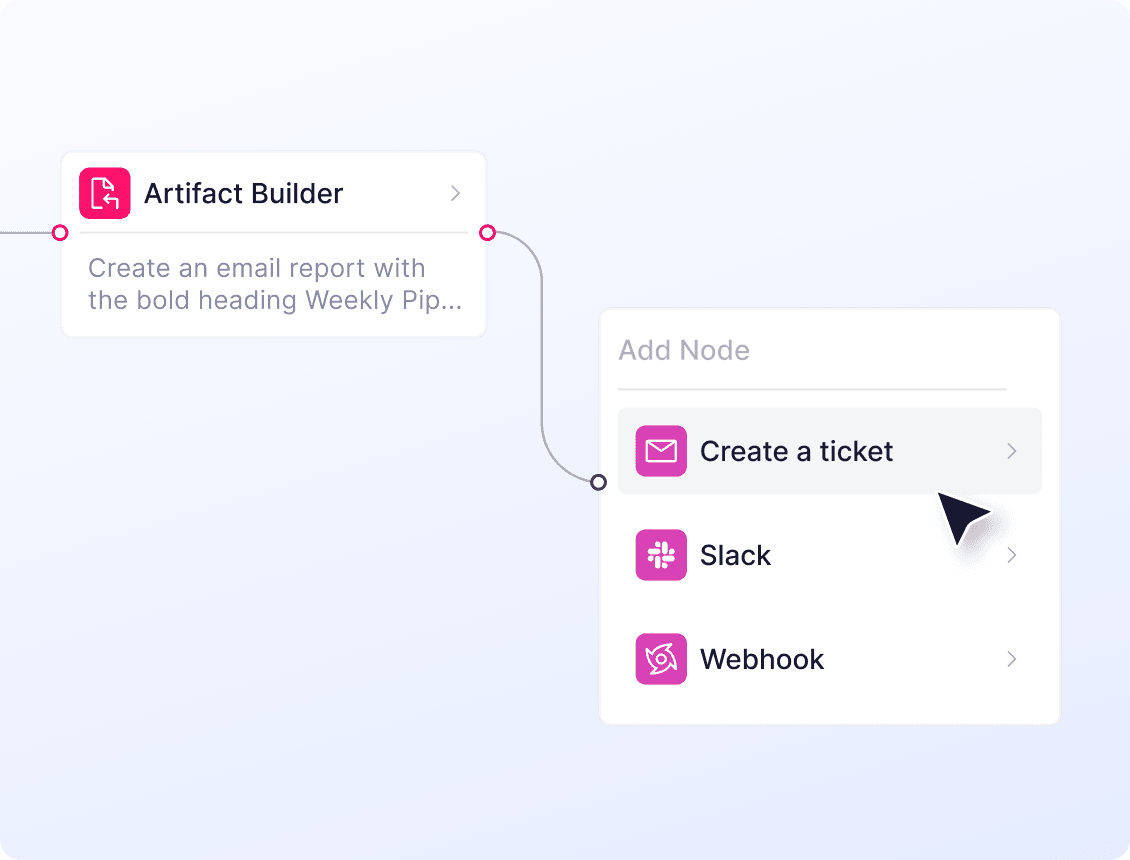
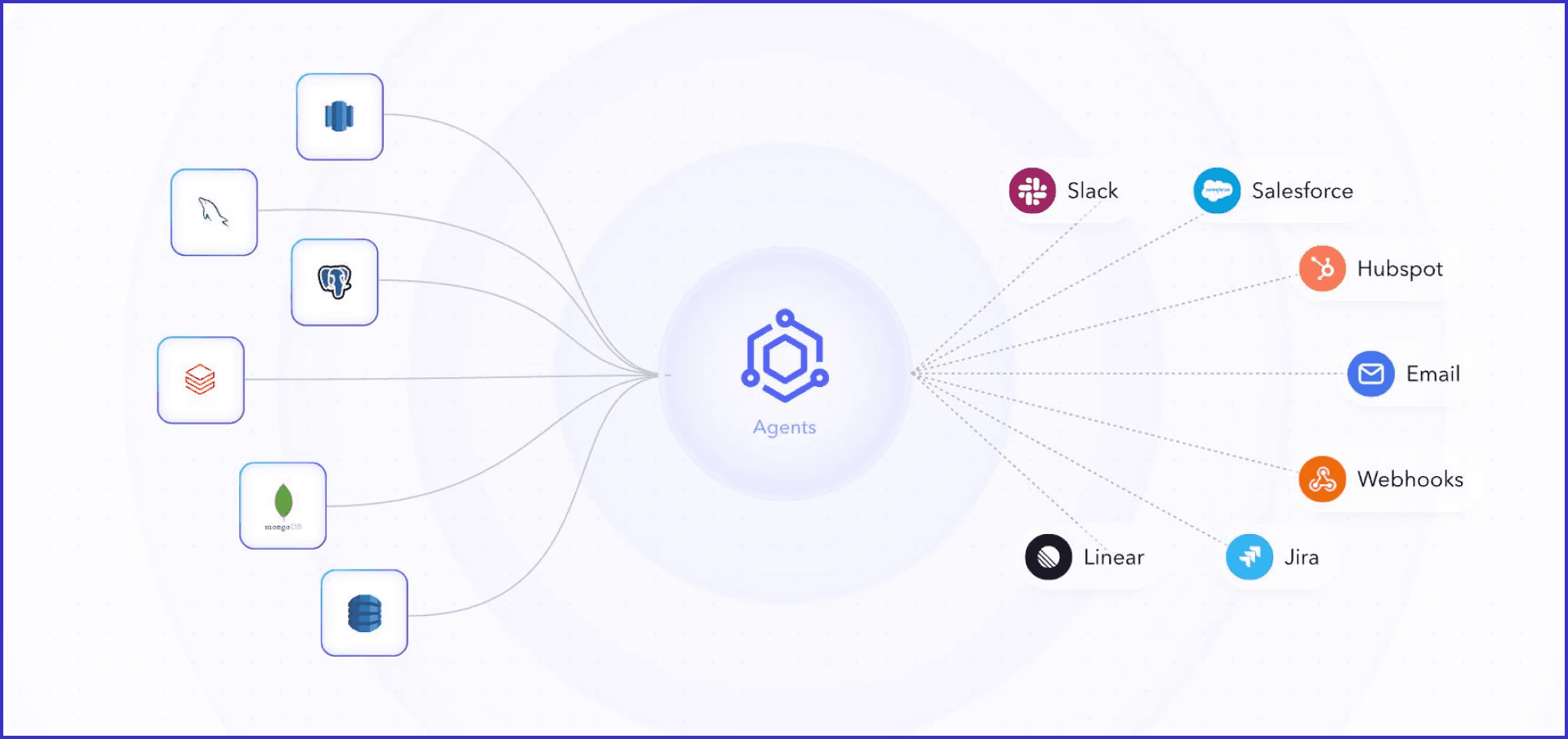
Even better, WisdomAI’s Analytics Agents turn that outcome into action. An agent can compare a metric across segments to find where a decline is concentrated, check whether the movement is seasonal, or watch campaign spend against budget. Then it acts on what it finds: pausing a campaign that’s burning through budget, creating a ticket with the supporting query attached, posting to the channel where the decision gets made, or escalating to the account owner.
And you can decide the boundaries: which metrics the agent watches, what counts as a meaningful change, who should hear about it, and what action it is allowed to take next.
Core components of AI agent trend analysis
Automated detection: Evaluates each change against historical ranges, forecasts, and normal volatility, so seasonality and routine variance don’t get reported as trends.
Multi-step investigation: When a change warrants attention, the agent evaluates it across relevant dimensions, compares time periods, and examines related metrics to identify potential drivers.
Cross-source reasoning: Connects signals across systems, such as linking an increase in support complaints to changes in product usage or retention.
AI-driven summary: Explains what changed, where it’s concentrated, and what’s driving it, written for the person who owns the decision rather than the person who owns the data model.
Confidence and caveats: States how strong the signal is and what the analysis couldn’t determine, so a weak finding isn’t presented with the same certainty as a strong one.
Traceable output: Includes the queries, sources, filters, and calculations behind each finding, so users can verify the conclusion against the underlying data.
Workflow triggering: Notifies the owner, opens a ticket, escalates the issue, or runs a defined workflow once a trend and its drivers are identified.
Benefits of AI agent trend analysis
Track business metrics continuously
Your view of the business is only as current as the last dashboard check, weekly report, or monthly review. Anything that changes between those checkpoints goes unnoticed, which leaves leaders deciding from a picture that is already out of date.
With agentic analytics: Performance monitoring becomes continuous. Leaders can get a written summary of what changed, what drove it, and where the movement is concentrated as new data comes in.
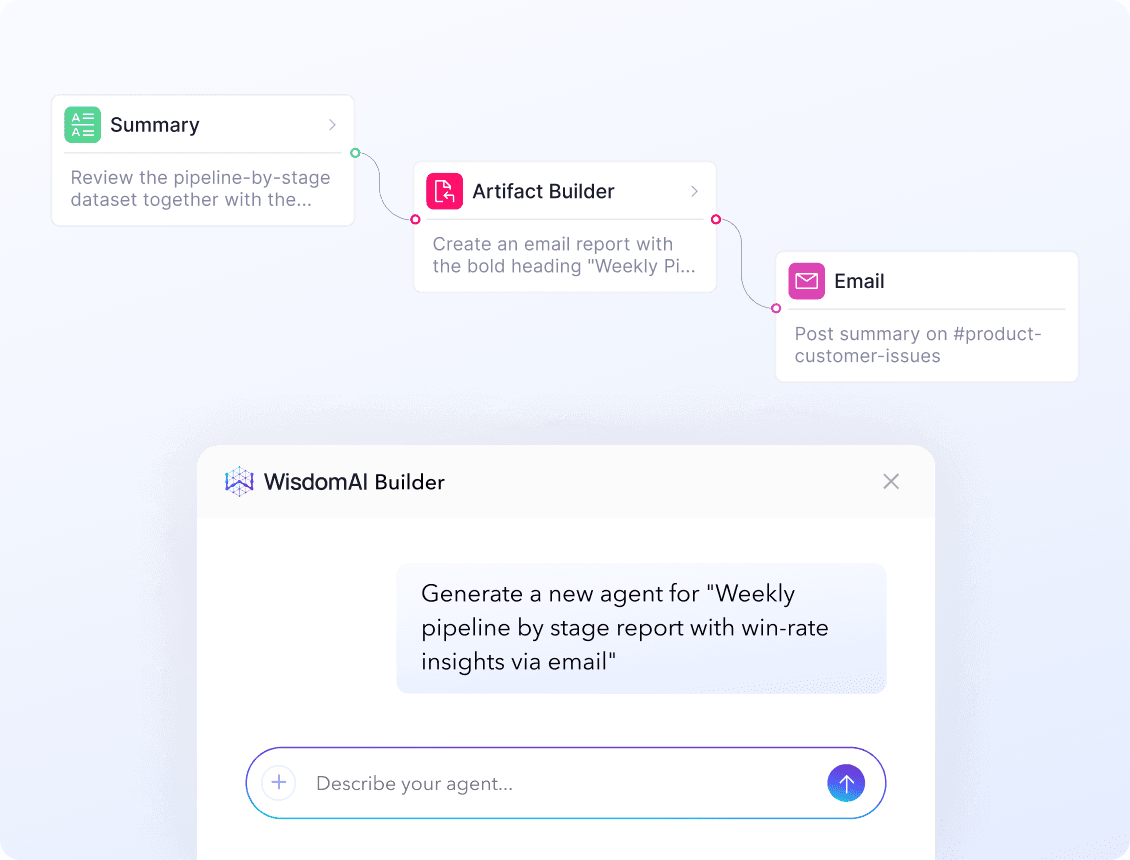
Moreover, coverage isn’t limited to standard reporting. Say what matters to your role — “alert me when pipeline coverage in my region falls below 3x,” “watch enterprise churn week over week” — and the agent gets built from that sentence.
Text-to-agent workflows turn an instruction into an agent that monitors the relevant data and takes the appropriate action when a condition is met. You spend less time checking whether a trend has moved and more time deciding what to do about it.
Reduce repetitive work for data teams
One unexpected movement can create days of work for your data team. They have to build models, break data down by region, compare it with last quarter, isolate the affected segment, then do it all again next week when a new query arrives.
With agentic analytics: agents run multi-step investigations at scale. Through agent orchestration, one step feeds the next — one agent segments the movement, another follows whatever outcome the previous step turned up, then compares periods and tests likely drivers. The same workflow runs across dozens of metrics and business areas at once, without turning each one into another manual workload for the data team.
What’s left for the data team is the work that actually needs them: modeling, governance, and infrastructure management.
Analyze trends across disconnected data sources
Take retail analytics. A customer might discover your product through search or social, browse the website, buy in store, contact support, then leave a review later. That is one customer journey, but the data behind it is spread across several systems.
Which makes trend analysis harder than it should be. When revenue drops in one region, the cause could be in transaction data, support conversations, product reviews, or some combination of them. Traditional analytics only gives you the part of the picture someone has already modeled for reporting, leaving important context outside the analysis.
With agentic analytics: agents can reason across structured and unstructured sources in the same workflow. The same regional drop can be analyzed alongside what customers are saying in reviews or support conversations, helping teams understand what’s driving the trend rather than viewing another metric in isolation.
Real-world use cases of AI agent trend analysis
Arm: supplier risk monitoring at scale
Arm designs the chip architecture behind most of the world’s smartphones and licenses it to hundreds of manufacturers. At that scale, supplier risk is too broad to manage through manual reviews alone. Arm’s procurement team started with Conversational BI in WisdomAI, then expanded to Analytics Agents to manage supplier risk analysis.
The team gave the agents a clear condition: flag any supplier where total spend exceeds $10 million. From there, the agents can monitor the threshold, pull in publicly available risk signals, filter for relevant information, and route the findings to the teams that need to act. Nobody runs a report. Nobody remembers to check.
That’s the difference between a dashboard and an AI analyst. A dashboard waits to be opened. An Analytics Agent already watches the threshold, reads the signals against it, and surfaces risk as conditions change.
Trumid: from monthly analysis to daily delivery
Trumid operates an electronic trading platform for institutional credit markets, where market conditions can shift quickly, and clients expect fresh intelligence to match. A monthly reporting cadence simply wasn’t enough.
With WisdomAI, Trumid moved to daily market insight delivery. The analysis is generated and packaged faster, giving client-facing teams a more current view of how their portfolio is moving across the market.
This shift has had a direct impact: Trumid now delivers daily market insights to clients 2x faster and is seeing the highest engagement its platform has recorded.
Descope: faster answers for GTM teams
Descope is a customer identity and access management platform whose GTM teams needed a faster way to understand pipeline performance and make decisions. With commercial and enterprise teams running different sales cycles across different market segments, the analysis had to flex across both motions without turning every question into a custom request.
With WisdomAI, answers that once took days can now come back in two to three hours, and sometimes within minutes. Sales managers can explore pipeline metrics, deal sources, and rep performance on their own, changing the shape of their work — less time assembling numbers, more time accelerating growth.
Challenges in using AI agents for trend analysis: Accuracy
AI analysts can analyze trends and act on them, but the outcome is only usable when you trust the numbers behind it.
The problem isn’t that the model can’t reason across your data. It’s that the model doesn’t know which conflicting definition to apply, which table is authoritative, or whether a business rule changed last month. Without that vital AI context, an agent returns an answer that looks entirely reasonable and is still wrong. And because the wrong answer travels through the rest of the workflow — into the summary, the alert, and the notification — it does more damage than an obvious error ever would.
Anthropic’s team ran into this exact problem. Their internal accuracy reached 95% through extensive context engineering, then fell to 65% in a single month as documentation drifted out of sync. That is why accurate and reliable AI analytics needs more than a capable model. Agents need governed enterprise context that stays current as definitions, schemas, and rules change.
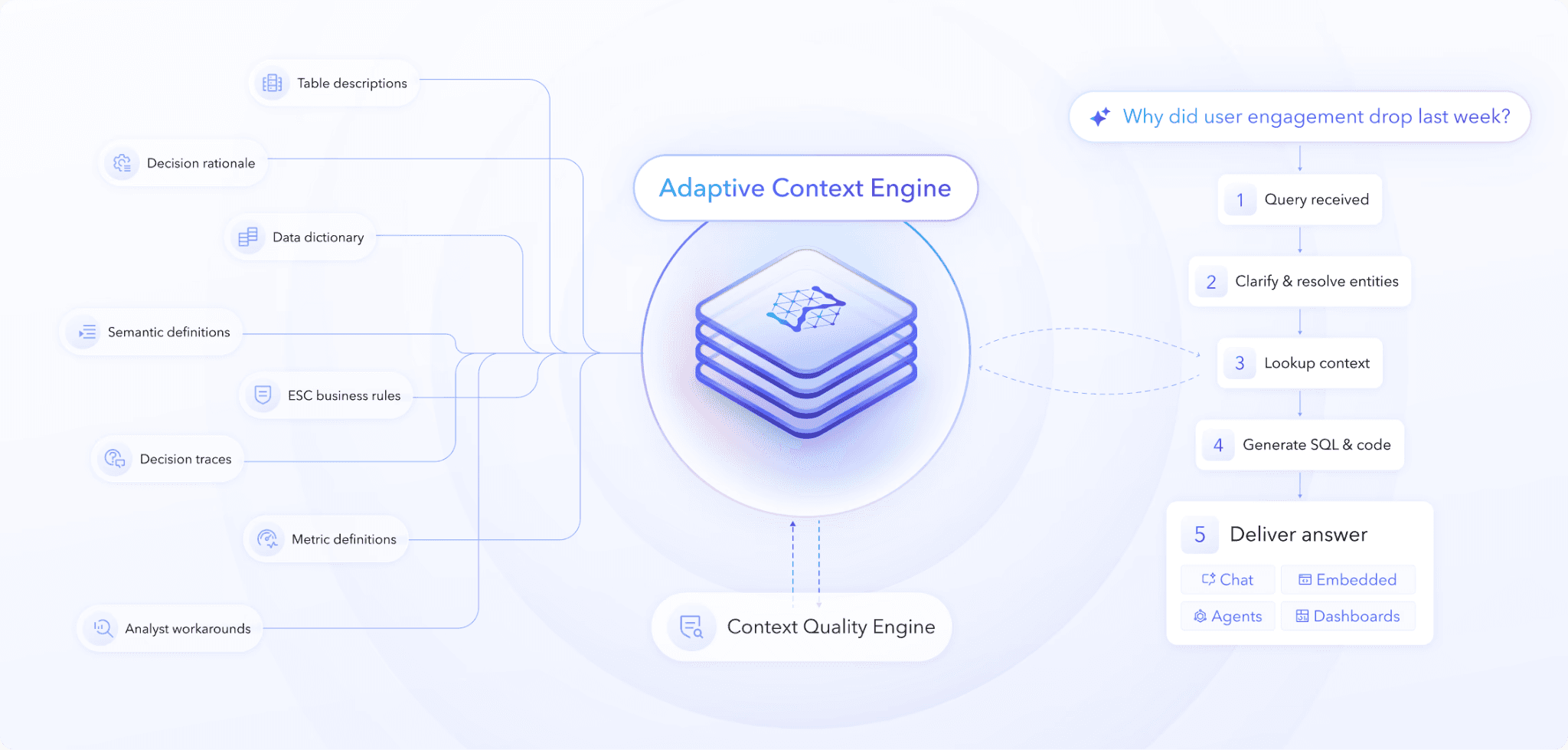
WisdomAI’s Adaptive Context Engine is built for that job. It continuously builds and governs context around metric definitions, authoritative sources, business rules, relationships, and usage patterns. For trend analysis, that grounds agents at every step, so answers stay accurate and explainable as the business changes underneath them.
Build a foundation that scales
AI agent data analysis succeeds or fails on the same thing: whether the agent understands your business well enough to interpret the data correctly.
WisdomAI builds and validates the business context behind accurate answers — then applies it in production across chat, dashboards, agents, and embedded analytics. That foundation lets you scale AI analytics without forcing teams to choose between speed and trust.
Find out what 95% accuracy looks like on your data. Book a demo.