Guide
MCP Tools: Model Context Protocol for AI Agents Data Analysis
AI agents are changing how enterprises work, but their impact is limited by how easily they can access and act on the external world. Each new integration—like connecting an AI agent to a SaaS app, cloud data warehouse, or internal business system—has traditionally required a custom connection. This often leads to a tangle of fragmented APIs, repetitive engineering, and inconsistent governance.
Each new agent, app, or model creates another point of integration, and every external tool brings its own unique interface and protocol. This results in an explosion of one-off integrations. For every N AI-powered applications and M business tools, organizations have N × M custom integrations, slowing innovation and making scaling real-world AI painfully complex.
The Model Context Protocol (MCP) directly addresses this challenge. MCP aims to do for AI agents what USB-C did for hardware, offering a single, universal plug that lets any AI model or agent securely access any compatible external tool or system. MCP provides a standardized, secure way for agents to exchange context, discover available tools, and invoke capabilities on remote servers.
In this article, we discuss what MCP is, why it matters, and how MCP tools and servers work together to unlock a new era of plug-and-play AI agent ecosystems for the enterprise.
Summary of key MCP tools concepts
Concept | Description |
|---|---|
What is MCP? | The Model Context Protocol (MCP) is the “USB-C” for AI apps. It removes fragmented integrations by providing a single protocol. Some tools are from official providers, e.g., HuggingFace MCP Server, Figma MCP Server, Azure MCP Server, etc. |
MCP Servers and Tools | The MCP tool is a callable plug-in endpoint, while the MCP server is a toolbox that publishes and runs these plug-ins. For example, Notion MCP Server has tools like search, create page, and update page. |
MCP Clients | MCP clients (e.g., Claude Desktop, Cursor, and Windows AI Foundry) discover available tools, validate inputs, and invoke tool functions. |
How do MCP tools relate to AI agents? | MCP tools empower AI agents by providing them with access to external knowledge and actions. In an agent-based system, MCP serves as the bridge that lets a data agent retrieve info or an action agent perform tasks without hard-coding each integration. |
Building/deploying an MCP tool | Decide if your MCP tool will run locally or remotely. Use a supported SDK (like FastMCP for Python) to define it. For deployment, bundle it with your app, expose it via an internal URL, or register it with platforms like Windows AI Foundry for OS-level integration. |
How MCP tools help with data analysis in text-to-SQL systems | The developer creates MCP servers for each database (MySQL, PostgreSQL, Snowflake, etc.), each exposing a “query” tool. The AI agent’s MCP client connects to these servers, and when a user asks a question about data, the agent selects the right tool and runs the SQL. |
Other emerging protocols | Aside from MCP, other emerging protocols include Google's Agent2Agent (A2A) protocol and the Agent Connect Protocol (ACP) launched by a Cisco-led project, AGNTCY. |
What is MCP?
MCP is a standardized way for an AI “host” (usually an agent or LLM interface) to connect to external “tools,” which could be databases, file systems, CRM platforms, etc. In MCP’s architecture, tools are hosted on a server (called an MCP server), and agents connect via a lightweight client that handles tool discovery and invocation. The MCP Market Map below shows the growing ecosystem around the Model Context Protocol (MCP), organizing key products and companies into categories like clients, servers, marketplaces, and supporting infrastructure. Each box highlights representative examples, offering a snapshot of the broader MCP landscape.
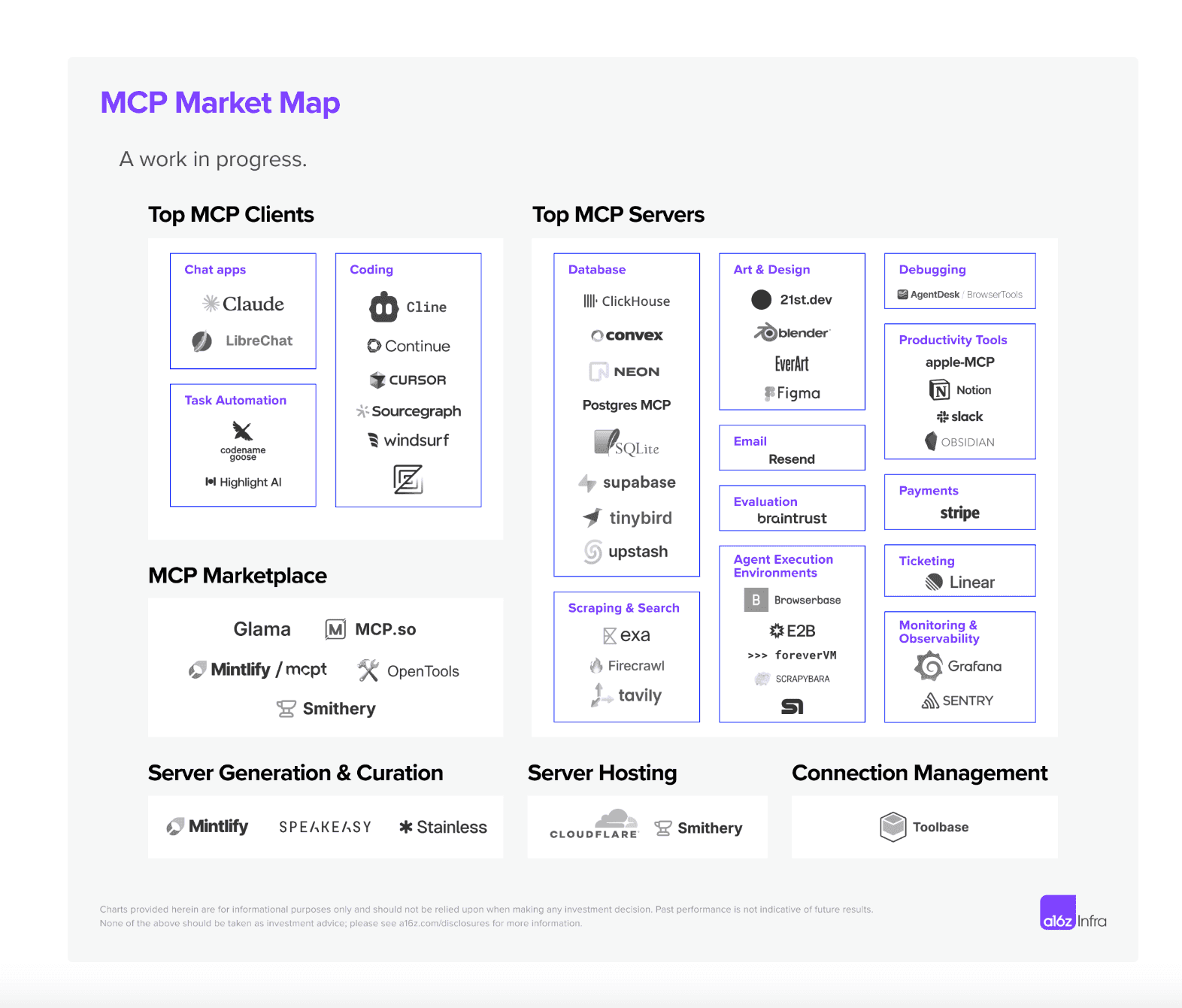
MCP market map (source)
Previously, if you had N AI applications and M different tools or data sources, you potentially needed N×M custom integrations—a complex and repetitive process that leads to fragmented integrations.
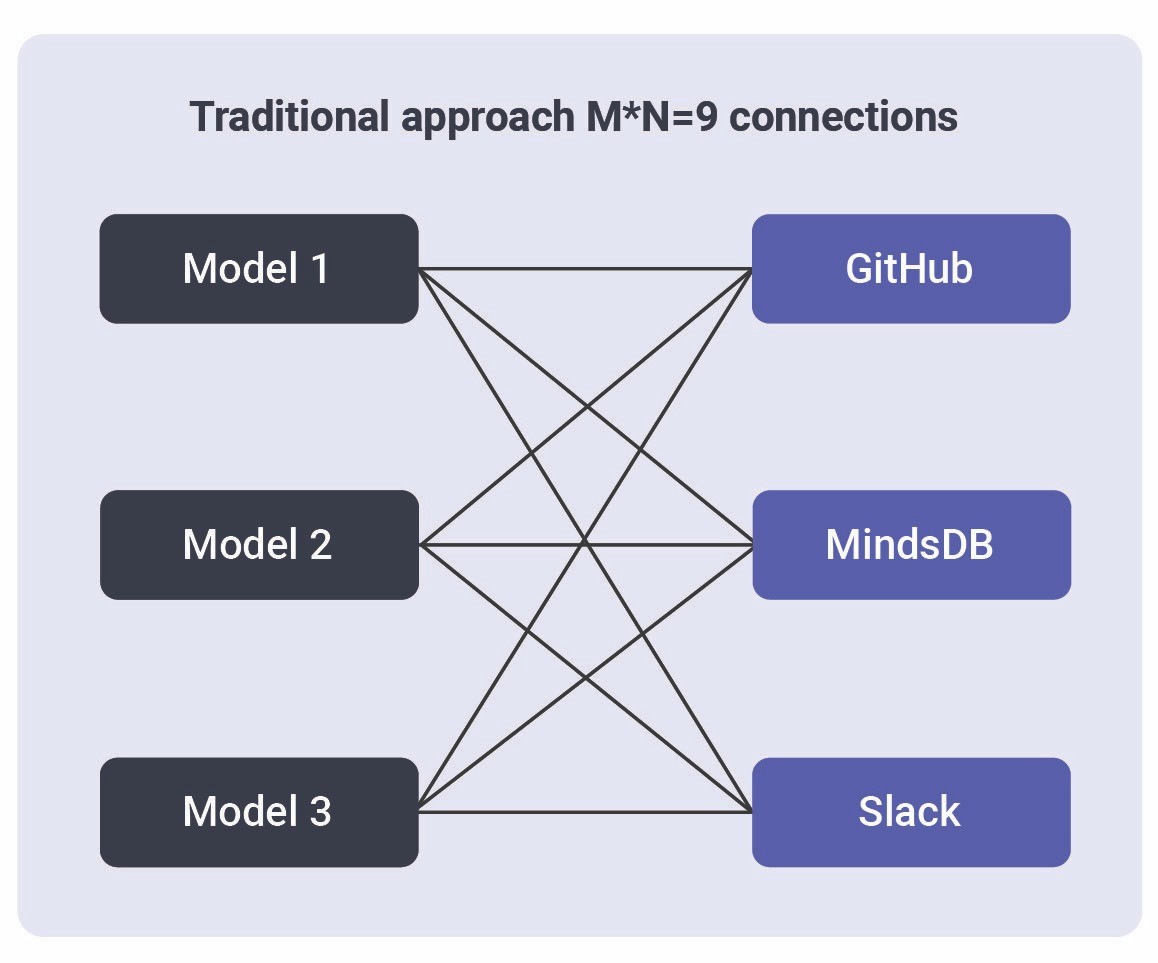
Before MCP (source)
MCP reframes this as an N+M problem where AI developers implement MCP clients once for their applications, and tool providers implement MCP servers for their systems. Any compliant AI app can then talk to any tool through the shared protocol, dramatically reducing duplication.
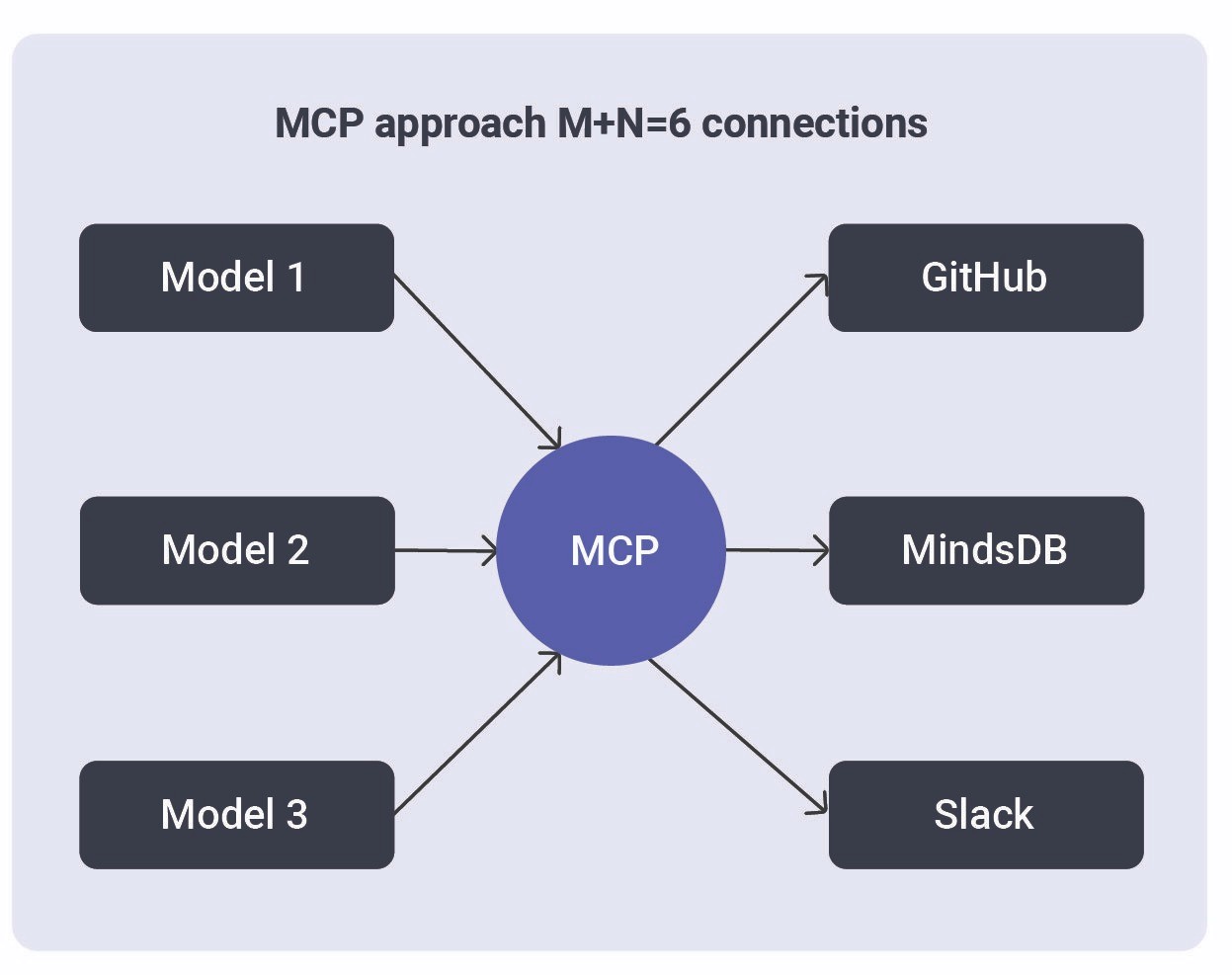
After MCP (source)
MCP servers and tools
At the core of the Model Context Protocol are two building blocks: MCP servers and MCP tools. Together, they provide a modular and scalable way to expose functionality to AI agents without requiring custom code for every integration.
MCP servers
Think of the MCP server as a toolbox. It’s a service that “hosts” and manages multiple tools, handles authentication (like OAuth), enforces access controls, logs usage, and ensures that rate limits or scopes are respected. Each server can publish a set of related tools, so one server might handle everything for Notion while another handles Stripe or PostgreSQL.
The code below provides a basic MCP server structure. This structure uses FastMCP, which is the standard framework for working with MCP. Since 2024, version 1.0 has been part of the official MCP Python SDK. It simplifies MCP server development by managing complex tasks such as server setup, protocol handling, content management, and error processing. This allows developers to focus on building MCP servers without getting bogged down in the technical complexities of the protocol.
MCP tools
An MCP tool is essentially a function or plugin that performs a specific task, such as running a database query, adding a new customer, updating a record, searching for documents, or generating a report. Each tool defines the following:
Name: What the tool is called (e.g., search, create_page, run_sql)
Description: What the tool does, in natural language
Input Schema: The required parameters, specified in a strict schema (typically JSON schema)
Output Schema: What the tool returns, also strictly defined
This schema-based approach ensures that any AI agent can safely invoke a tool, validate its inputs, and correctly interpret its outputs irrespective of the programming language or platform it’s running on. The table below shows real-world examples of MCP tools.
MCP Server | MCP Tools | What each tool does |
|---|---|---|
search, create_page, update_page | Finds content across Notion and connected apps, adds new pages, and edits existing pages | |
create_customer, refund_payment, list_invoices | Manages customers, issues refunds, and fetches billing/invoice history | |
deploy_app, view_logs, rollback_release | Builds and deploys new slugs, streams application logs, or rolls back to a previous release |
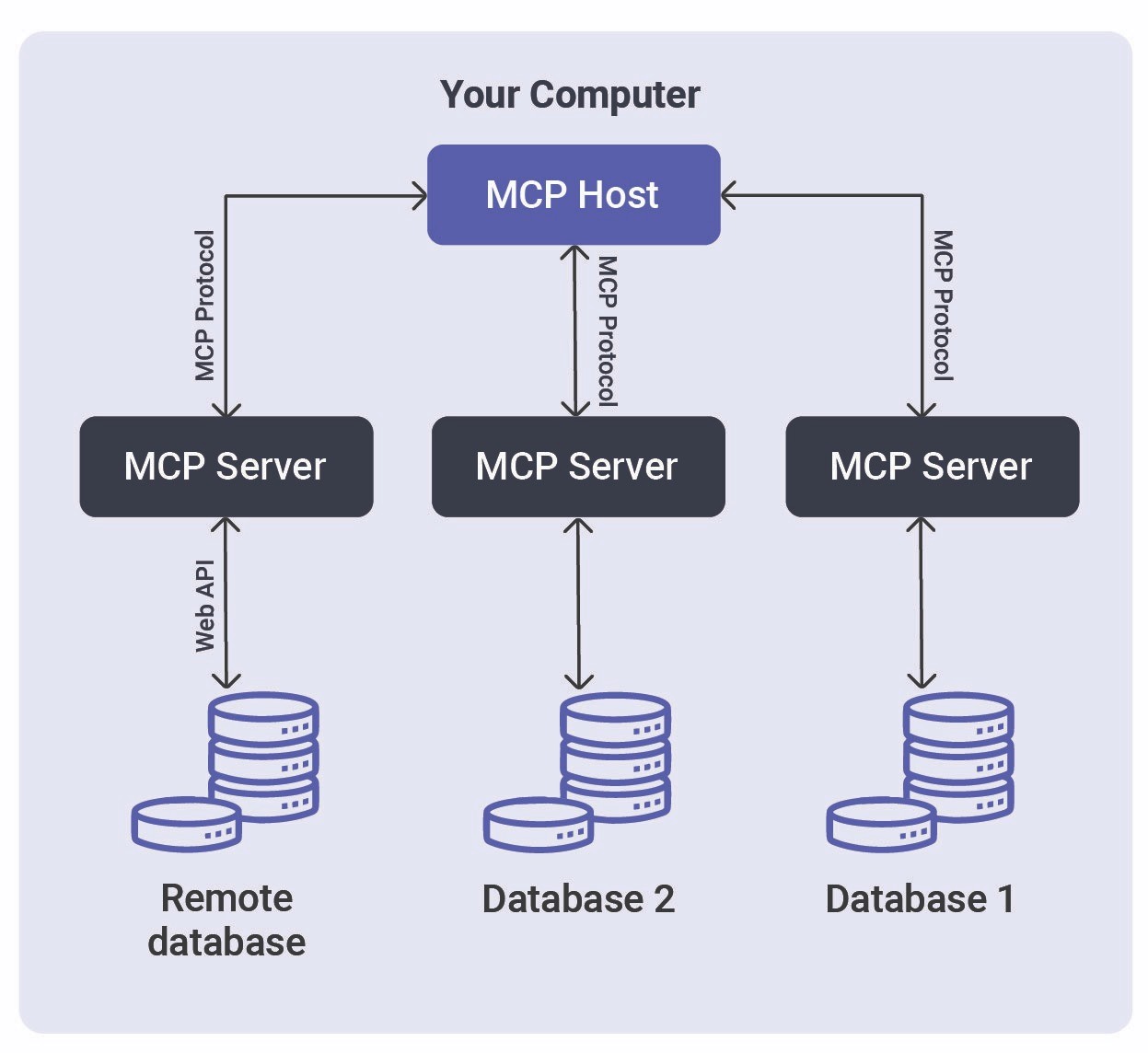
Model Context Protocol showing MCP servers connecting to data sources and remote services (source)
MCP clients
While MCP servers and tools provide the functions and capabilities, MCP clients enable AI agents or applications to discover, invoke, and interact with those tools. In other words, MCP clients are the “operators” that make requests, fill in parameters, validate responses, and stream results back to the user or workflow.
An MCP client typically lives inside an AI-powered application, agent, or even the host operating system. It handles the following processes:
Listing available tools: Discovering which tools are published by connected MCP servers
Validating inputs: Ensuring that any data passed to a tool matches its defined input schema
Invoking tools: Making secure, authenticated calls to the right tool endpoints
Streaming or returning results: Delivering the output (sometimes in real time) back to the AI agent or user
In a nutshell, the primary task of an MCP client is to simplify the process for the AI agent. Instead of hard-coding logic for each tool, the agent simply asks the client “what can I do?” and gets back a structured list of actions. The client takes care of formatting the request, handling authentication, and parsing the response.
This separation between clients (which discover and invoke tools) and servers (which host and manage the tools) is a core architectural principle of MCP. Real-world examples of MCP clients are provided in the table below.
MCP Client | What it is and does |
|---|---|
A local AI assistant that bundles an LLM agent and MCP client to access tools like local file search, calendar management, or cloud integrations | |
An AI-powered coding environment where the MCP client serves as a plug-in hub, letting the agent connect to version control, documentation, database, or deployment tools | |
Microsoft’s OS-level implementation, an MCP client that provides AI agents with a secure, managed way to invoke system APIs or business applications |
How do MCP tools relate to AI agents?
AI agents are autonomous or semi-autonomous systems that reason, plan, and act to achieve user goals. Here are three key ways that MCP empowers and extends AI agents.
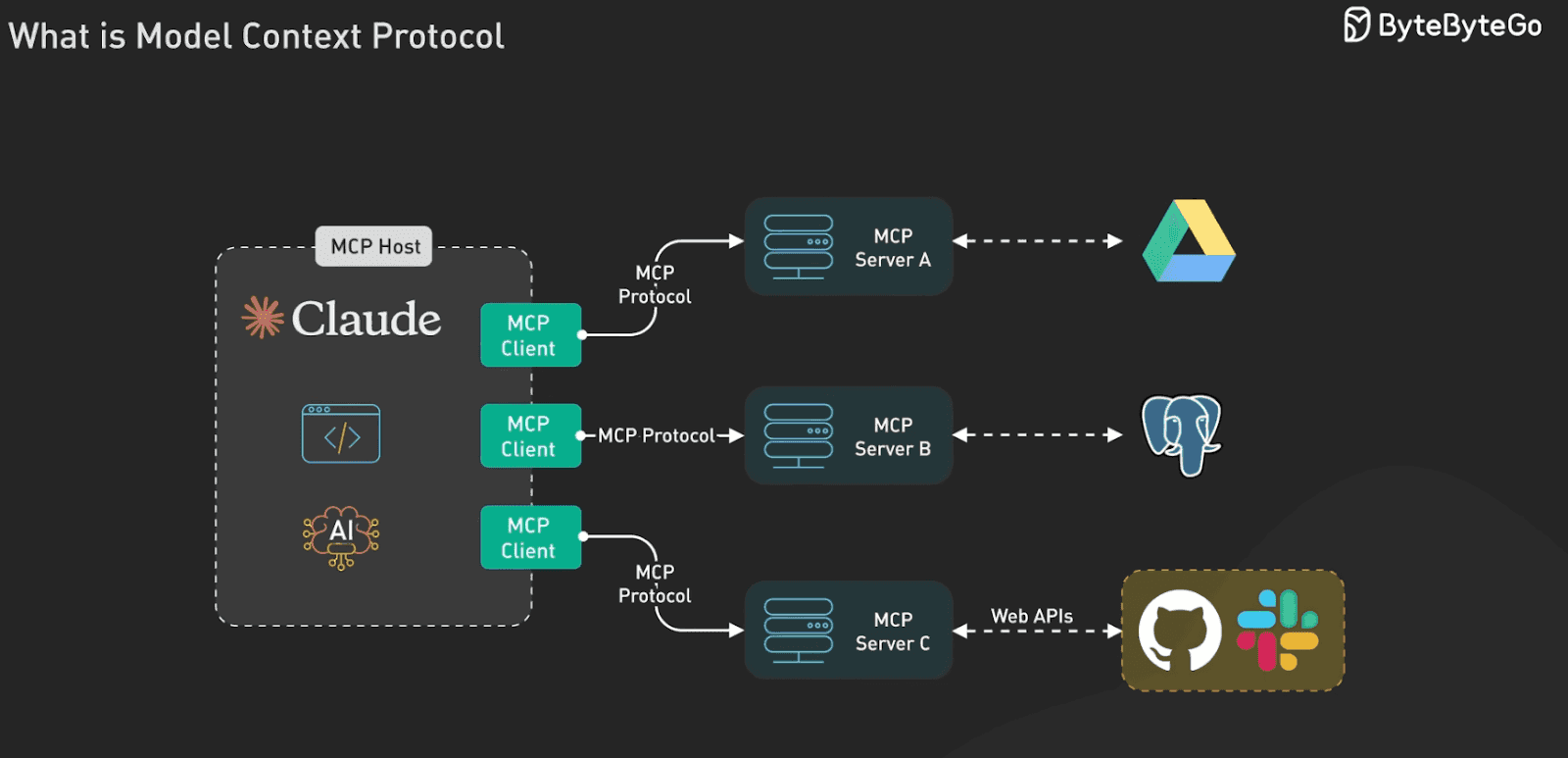
MCP clients enable agents to discover and invoke tools (source)
Agents become fully capable automation layers
With an MCP client, an AI agent can dynamically discover available tools, decide which to use based on user intent, and invoke them with structured inputs. This moves the agent beyond simply answering questions, allowing it to complete tasks and automate business processes end to end.
For example, consider a product manager who opens Claude Desktop and makes this request: “Send me a chart of top-performing products last quarter and email it to marketing.” Behind the scenes, Claude’s agent discovers that an MCP server—say, analytics-mcp—is available. It discovers available tools like run_sql, create_chart, and email_report. The agent chains them together, retrieves the data from a Snowflake DB, generates a chart, and emails it, all using MCP tool calls.
Standardization across agent frameworks
Many AI agent frameworks (e.g., LangChain) have the concept of “tools” or API access for LLMs. MCP doesn’t replace the agent’s logic or planning abilities, instead standardizing the interface to those external tools. This means that whether your agent is a simple chatbot or a sophisticated multi-agent system, if it speaks MCP, it can tap into a whole library of community-built tools. The agent just needs one generic method to invoke any MCP tool, and the protocol ensures the correct function gets called.
This interoperability creates an ecosystem of AI agents and tools working together. In fact, Microsoft describes the rise of an “agentic world” where software agents can discover and utilize various MCP services on a platform as easily as humans install apps.
Agent collaboration
In advanced use cases, you might have multiple agents collaborating; as we outlined in our conversational analytics guide, there could be data agents, planning agents, insight agents, etc. MCP can facilitate communication and task delegation among such agents. For instance, a planning agent could, upon receiving a high-level instruction, identify that it needs data from a database and delegate that subtask to a data agent equipped with an MCP database tool. Once data is retrieved, an insight agent might use an MCP analysis tool to generate a summary, and finally, an action agent could use an MCP connector to send out a report. Because MCP tools are modular and discoverable, each agent doesn’t need to know the nitty-gritty of every system; they just call the appropriate MCP function.
Building and deploying an MCP tool
The first step in building an MCP tool is to decide where the tool should run. Some tools make sense as local services, bundled with a desktop agent or application, like file search or screenshot tools available only on a user’s device. Others are best exposed as remote services, accessible over a secure network so that multiple agents or teams can use them. The deployment location usually depends on where the resource lives (such as local files, private databases, SaaS APIs), security needs, and how broadly you want to expose the capability.
Once you know where your tool will live, the implementation is mostly about following a schema. MCP tool definitions are strict: Every tool exposes a name, a natural-language description, an input schema, and an output schema, typically in JSON.
Popular frameworks to build MCP servers include FastMCP, the official MCP Python SDK, Java SDK, Ruby SDK, and TypeScript SDK. You can also discover open source and commercial MCPs on MCP Server Finder. This documentation also provides all the necessary details about MCP.
Example of building an MCP server to access a database
Many AI assistants require secure access to databases, which you can accomplish by building an MCP server, as shown in the code below. Such a server offers safe, read-only access to the database using parameterized queries, which helps prevent SQL injection attacks. This setup enables assistants to analyze data and answer questions while keeping the database protected.
When it’s time to deploy, you have options. You can run the MCP server alongside your AI agent (for tools that only need local access), host it behind an internal URL (for teams or organizations), or register it with a system-wide platform such as Windows AI Foundry so that any agent on the network can discover it.
How MCP tools help with data analysis in text-to-SQL systems
One of the immediate benefits of using MCP can be seen in enterprise data analysis, especially text-to-SQL scenarios. Traditionally, connecting an AI agent to company data has meant writing custom adapters for every data warehouse or SQL engine, like MySQL, PostgreSQL, or Snowflake. With MCP, this process becomes standardized. A developer can set up an MCP database server for each data system, say, an internal PostgreSQL reporting database or a company Snowflake warehouse. Each server exposes a “query” tool with a clear, strict input schema (typically a SQL query string) and a defined output schema (usually rows as JSON). This abstraction means every database, regardless of vendor, looks the same to the AI agent.
The workflow is straightforward: A user asks a business question in natural language, such as: “Show monthly sales by product category for 2022”. The AI agent takes this input and turns it into an SQL query behind the scenes. Next, the agent’s MCP client discovers the available MCP database servers and picks the appropriate query tool based on the data source. The agent passes the generated SQL to the tool, gets the results in JSON format, and shares the answer with the user. For enterprises, this model reduces the friction of connecting new data sources, while for users, it means being able to ask questions about any data, wherever it lives.
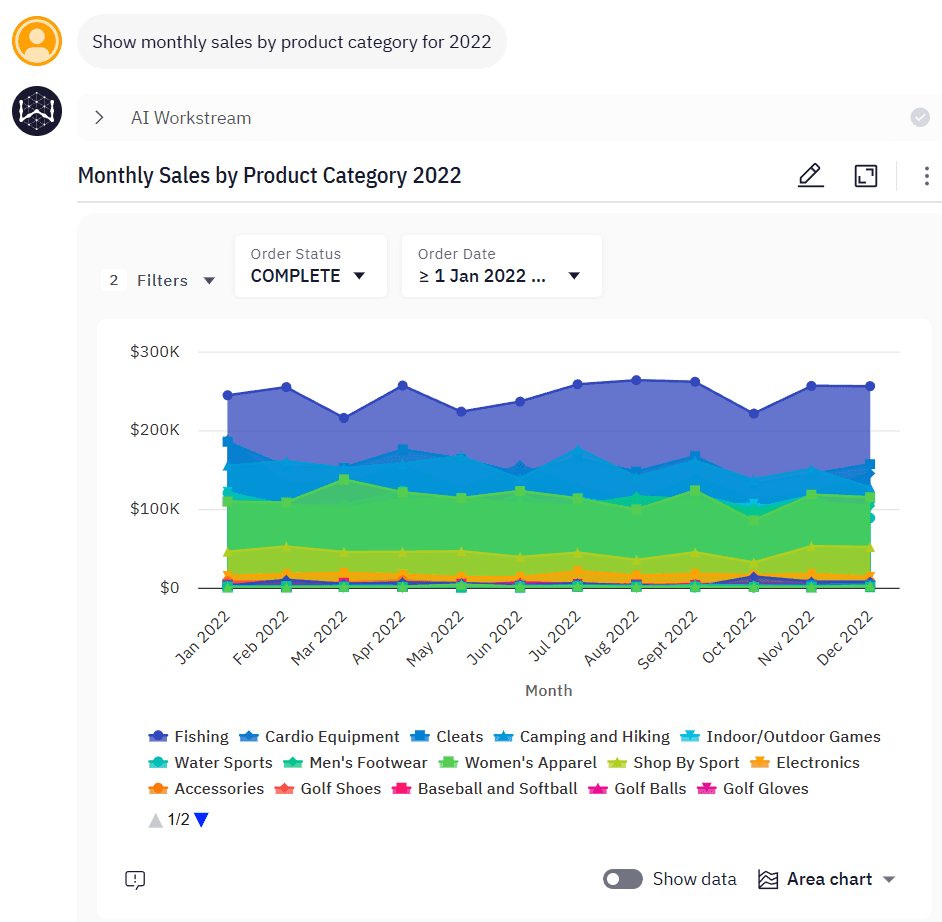
WisdomAI natural language interface
Security considerations
As powerful as MCP is, it must be deployed responsibly and with security in mind. First, you can implement least-privilege access for each tool. Every MCP tool should require explicit scoping, whether that’s through OAuth tokens, API keys, or some kind of workload identity. This way, agents can only get into the tools they are authorized to use.. For example, a marketing agent might be allowed to call run_sql but not delete_customer.
Second, input validation must be enforced. MCP uses JSON schemas to define each tool’s input. You can take full advantage of this by specifying required fields, formats, and allowed values. This guards against injection attacks or invalid inputs.
Third, logging and observability are critical. MCP encourages detailed logging for every tool that gets used, tracking who or what called it, when, what information was sent, and what result came back. This kind of tracking makes it easier to audit what happened, fix problems if something goes wrong, and make sure everything is working as it should.
The great thing is that modern enterprise AI analytics platforms like WisdomAI already provide robust enterprise-grade protections—including role-based access control, granular row- and column-level security, and detailed audit logging—all enforced across supported data systems like PostgreSQL, Snowflake, BigQuery, Redshift, SQL Server, Databricks, and CSV files. For organizations that want a unified way to connect diverse tools or standardize integrations across different environments, MCP works alongside WisdomAI to make these connections even simpler.
Other emerging protocols
While MCP is gaining traction as a standard for connecting AI agents and tools, it’s not the only protocol in this space. Other emerging protocols include Google’s Agent2Agent (A2A) protocol and Cisco’s Agent Connect Protocol (ACP).
A2A was launched by Google in April 2025 with the support of over 50 technology partners, including MongoDB and Atlassian. It allows AI agents to communicate with each other while exchanging information securely.
ACP was developed by the Cisco-led AGNTCY project. It enables agents from various frameworks and platforms to communicate with one another.
It is worth noting that these protocols are not rivals to MCP, rather, they are complementary. MCP enables agents to plug into tools and data sources; ACP enables agents to plug into each other; and A2A provides standardized pathways for dynamic agent interaction and discovery.
Last thoughts
The Model Context Protocol (MCP) was introduced by Anthropic in November 2024 and offers a straightforward way for companies to connect AI agents to their existing tools and data. Instead of building a custom integration every time, teams can use MCP to connect once and work with a range of systems.
With MCP, companies can accelerate the rollout of new AI-powered applications, simplify data access, and create true agentic workflows, where intelligent agents can reason, act, and collaborate with minimal friction. At the same time, the protocol’s rigorous approach to security, schema validation, and access control ensures that this new flexibility does not come at the expense of enterprise trust or governance.
Together with other emerging protocols like Google’s A2A and Cisco-led ACP, MCP will help unlock a robust agent ecosystem that enables enterprises to achieve their full potential.