Our GTM context layer turns hard questions into trusted answers

I joined WisdomAI in February 2026 as the first GTM hire outside of sales or marketing. We were making the transition from founder-led sales to sales-led growth, with a team of AEs, BDRs, and marketing starting to fuel our pipeline and drive growth. My goal was to build mechanisms to report progress, track metrics, and flag risks before they spread into systemic gaps as we pursued hypergrowth.
As the company building the first Agentic Intelligence Platform delivering trusted, accurate, and proactive insights, we knew we needed to use our product in practice — or “eat our own dogfood” as they say. So, my first assignment was to set up our GTM context layer, leveraging WisdomAI’s Adaptive Context Engine.
In GTM, having the right context means ensuring that any AI agent or LLM conversation understands your business and process without having to guess, hallucinate, or worse, assume. By documenting our own journey, we hope to help others doing the same.
Key Takeaways
Don’t stop at using AI-drafted outreach emails and account research. A trusted source of context and a surface for interaction will remove bottlenecks in your insight journey. With this in place, your GTM data becomes accessible and consistent, but more importantly, you are increasing trust in answers.
GTM data lives in many different tools and systems, each with its own nuances and depth. However, each tool only provides part of the picture. Once you connect your data sources with defined business logic, you start seeing a very different picture of why day-to-day decisions do (and don’t) work.
Before you pick your mechanism, decide what you want to measure and when you need to act on it. An ad hoc chat, an agent, or a pre-built dashboard will all answer your question, but each of them trigger actions differently. The more thought you put in at this stage, the better the outcomes.
Waiting for clean, AI-ready data structures is a fruitless exercise. AI systems are smart enough to break the ties and join the dots if you provide the right context on what matters to your business. You will get to the desired end state even with imperfect data.
Where we started
The tool sprawl in the modern GTM tech stack is a familiar problem for many leaders and operators. In our case, each team in the GTM engine had a different operating system that they relied on as the source of truth. Because most of the team preferred going to their preferred systems independently, leadership had to speak to individuals to get the answers they needed. Connecting the dots was the tough part.
Obviously, I was not the first bright person to come up with this idea. We had connected some of the sources in WisdomAI, but the full picture was still fuzzy at best, creating a number of inconsistencies based on who asked the question and how. Because of this, there was a lack of trust in the AI-generated answers, and the process of getting to a trusted answer was largely inefficient and time-consuming
My job was to get the leadership team and cross-functional stakeholders consistent answers about the key metrics that we care about: pipeline generation, stale pipeline, what is helping and what is hurting our GTM from real prospect feedback. I needed to deliver all of this without having to switch between each tool, the way it interprets the data, and arrive at definitive answers across the GTM funnel. I didn’t have an army of analysts and data engineers at my disposal, and yet still, I needed to deliver a solution quickly.
I am sure this sounds very familiar to anyone operating in the RevOps/GTMOps/GTM Strategy umbrella. This is the hard part of actually fixing a GTM engine. But we knew that setting up an operating system that can speak the same language across the different components would help us achieve escape velocity. That was our trajectory.
What we achieved
Today, we can confidently say that we have reduced the pain we were going through, with more evolutions underway. Here are some of the outcomes from our initial effort:
Trusted answers are accessible by everyone, in one central location
Before: The ability to report the pipeline number was anchored to CRM labels that not everybody knew or could access. Every RevOps pro knows that pulling data from a CRM is easy, just needs 3 filters on specific properties, 2 joins on different objects, and the right visualization depending on the question. Then we have our answer. A few small lifts exist after that easy task: you still need to be around to remind people how to interpret the data, so every question needs an iteration and a new report. Even though the data exists, you are the bottleneck for insights.
After: Nobody debates the accuracy of WisdomAI answers on current open pipeline, forecasts, or bookings for the quarter, and no one questions whether a particular stage or deal type was included/excluded. If the CRO needs a funnel visualization, they get a graph. If enablement needs to know the number of days deals are stuck in a specific stage without having to switch systems, they get both the metric and the reasons as an actionable artifact. Each of these questions is answered in a single place.
Data informs what we do (and don’t do) next
Before: When deals were won or lost, a conclusion as to why was derived based on anecdotal evidence. Or worse, in some cases we failed to learn from our losses or wins, and valuable insights weren’t shared until an official review/inspection meeting.
After: Every deal that is won or lost is supported by reasons, grounded in the truth as spoken by customers themselves. Every day, a WisdomAI agent looks at the trajectory of a deal in the CRM, connecting it with the call transcripts to hear what the prospect shared, what they tried in the actual POC environment, what we did well and where we failed, and account-specific recommendations to increase the odds of success. This analysis arrives as a neat summary in Slack at the same time every day.
Every campaign action is tied to impact
Before: Marketing and sales had different views on the outcomes of every campaign, event, and lead. Having data across different systems meant more questions than answers. Outcomes were also difficult to measure. Every campaign required gymnastics to retain target lists, track BDR activity before and after an event, and understand what actually transpired at the event.
After: For every marketing campaign that we drive, WisdomAI produces an ROI artifact in a fixed template that retains context and translates outcomes over a period of time. This artifact is customized to actions from different teams, including BDR calls before the event that drove booth walk-ins, booth walk-ins that became deals, and BDR follow-ups on session attendance that became deals. Every team can now see how their actions are impacting real pipeline and customer outcomes.
Proactive agents deliver intelligence on deals and prospects
Before: Every prospect meeting with a founder needed an impromptu call with the AE to understand the persona and the conversations to date. Due to busy calendars and chaotic schedules, most of the time, founders were left winging the meetings that took a lot of effort to secure. More importantly, it means we didn’t have as impactful of a conversation as we could have with prospects.
After: An agent on WisdomAI scans the founder’s calendar and drafts a brief including topics covered in the most recent conversations, POC usage and success, and potential objections they should prepare for. They can also ask and answer account-related questions in their preferred AI chatbox, Claude or ChatGPT, through our WisdomAI MCP connections.
How we built it
To truly transform the GTM team with AI analytics, we first needed to connect our fragmented data sources in one system. But simply connecting your data to AI isn’t enough. For AI to deliver accurate answers across these complex GTM environments, we had to explain, and constantly maintain, how our business interprets this data. That’s the power of WisdomAI’s Context Engine. Below, I’ll explain how it all comes together.
Data federation
GTM has a number of disconnected sources, each playing an important role in understanding our pipeline and trajectory. Here are a few of note:
System | What data | Why it matters | Data complexity |
CRM - System of Record | Definitions and properties of different objects behind the GTM process (Leads, Contacts, Deals, Opportunities, Campaigns, Company, Account) Relationship between each property and object | Source of truth for pipeline and campaign performance Proactive forecasts, reactive lookbacks, and detailed understanding of changes at different points in time Insights on key GTM metrics including forecasts, sales cycles, win rates, and conversion rates | Medium: Largely structured data, well documented for agents to understand While it is the expected System of Record, complexity arrises due to Rep discipline. Documentationis tough to automate given the number of corner cases |
Conversational Intelligence - Deal Insights | Raw call recordings and transcripts of conversations with prospects and customers | Explains the underlying reasons for why changes are happening in the pipeline journey | Medium: Unstructured data that is different for each deal, prospect, and rep. |
Prospecting System - Outreach intelligence | Campaign names, Contact lists, Call scripts, Email messaging | Explains the prospect’s journey to opportunity, providing vital insights on the account and repeatable patterns for GTM | Low: Clear relationships between datasets with some unstructured data; mostly smaller datasets since calls/emails are expected to be short |
Product Usage | Customer and prospect-level usage of WisdomAI | Understand POC use cases that are driving value and identify growth opportunities/risks | Medium: Combination of structured data of events and unstructured data about actual conversations and use cases |
These are the data sources we started with to achieve a minimum viable outcome. Connecting these sources is not more than a few hours of work, sometimes only a matter of a few minutes. The data could come in through an MCP server or straight from your data warehouse, and the data lives in the systems without any copies being created on Wisdom.
Over the last few months, we have added many more data sources and use cases, but I will save that for a different post.
Architecting context
With the data sources connected, we came to the “hard part” — context engineering. But because we’re using WisdomAI, the hard part is pretty straight forward. To get started, I simply started writing down the context in natural language, but you can also provide approved SQL queries for more deterministic responses to repeated queries if you want to take that route.
The context I added was anchored around a few different dimensions:
Process: What does pipeline mean? What are our sales stages? What do we mean by forecast?
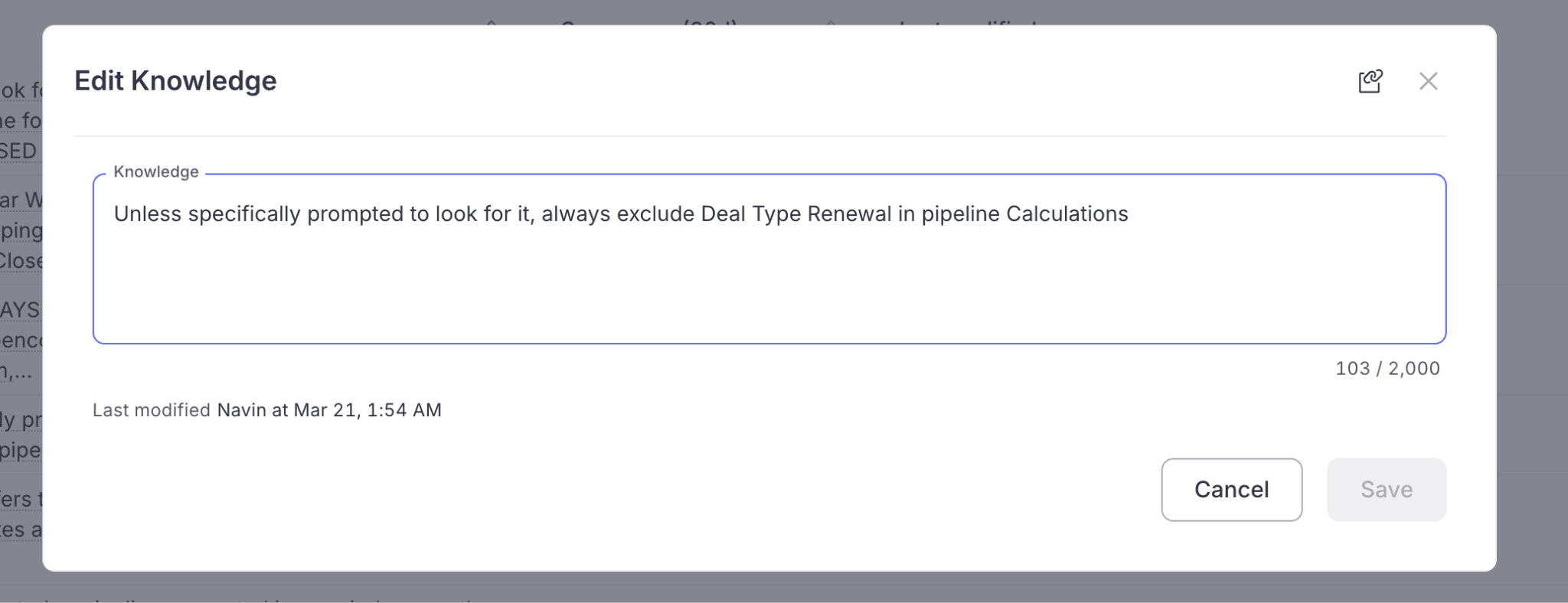
Example: Natural language explanation of pipeline rules
Reviewed queries: Pre-defined SQL queries for specific analysis and outcomes
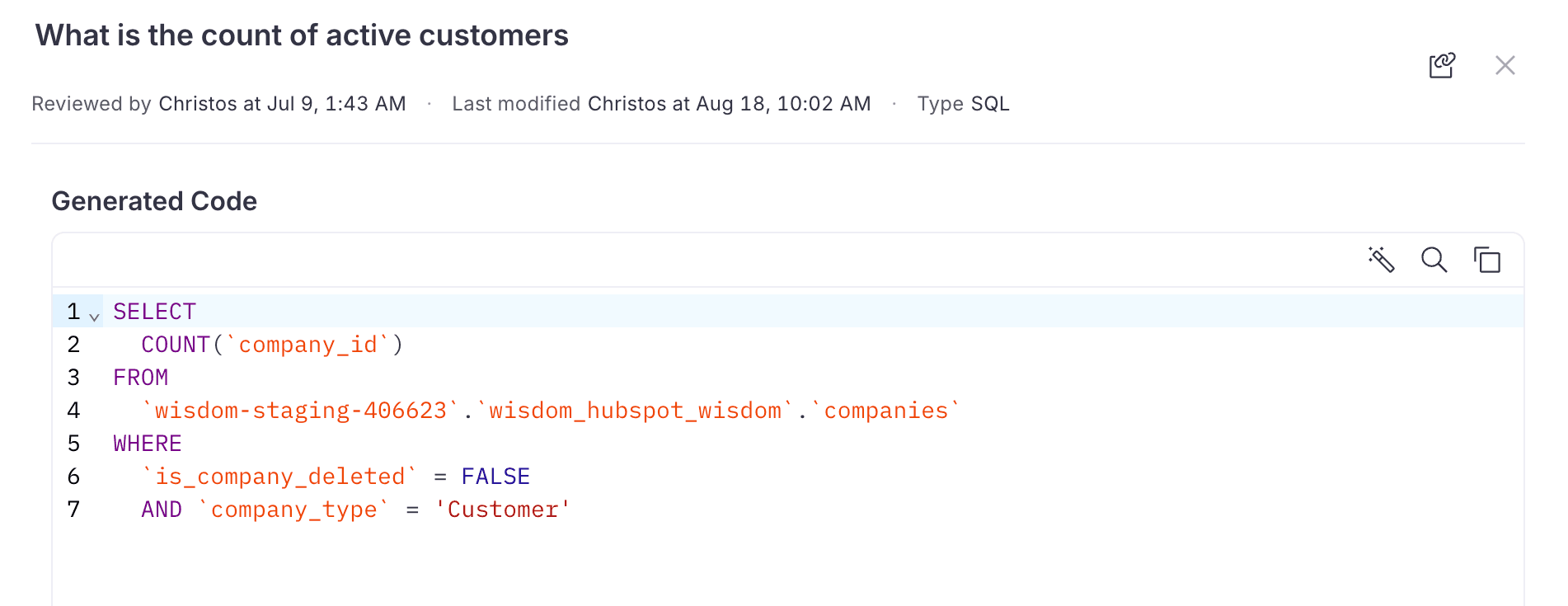
Example: SQL for extracting customers. Btw, I generated this from a chat with Wisdom; I did not write this code myself!
Metrics: Consistent GTM metric definitions for accuracy
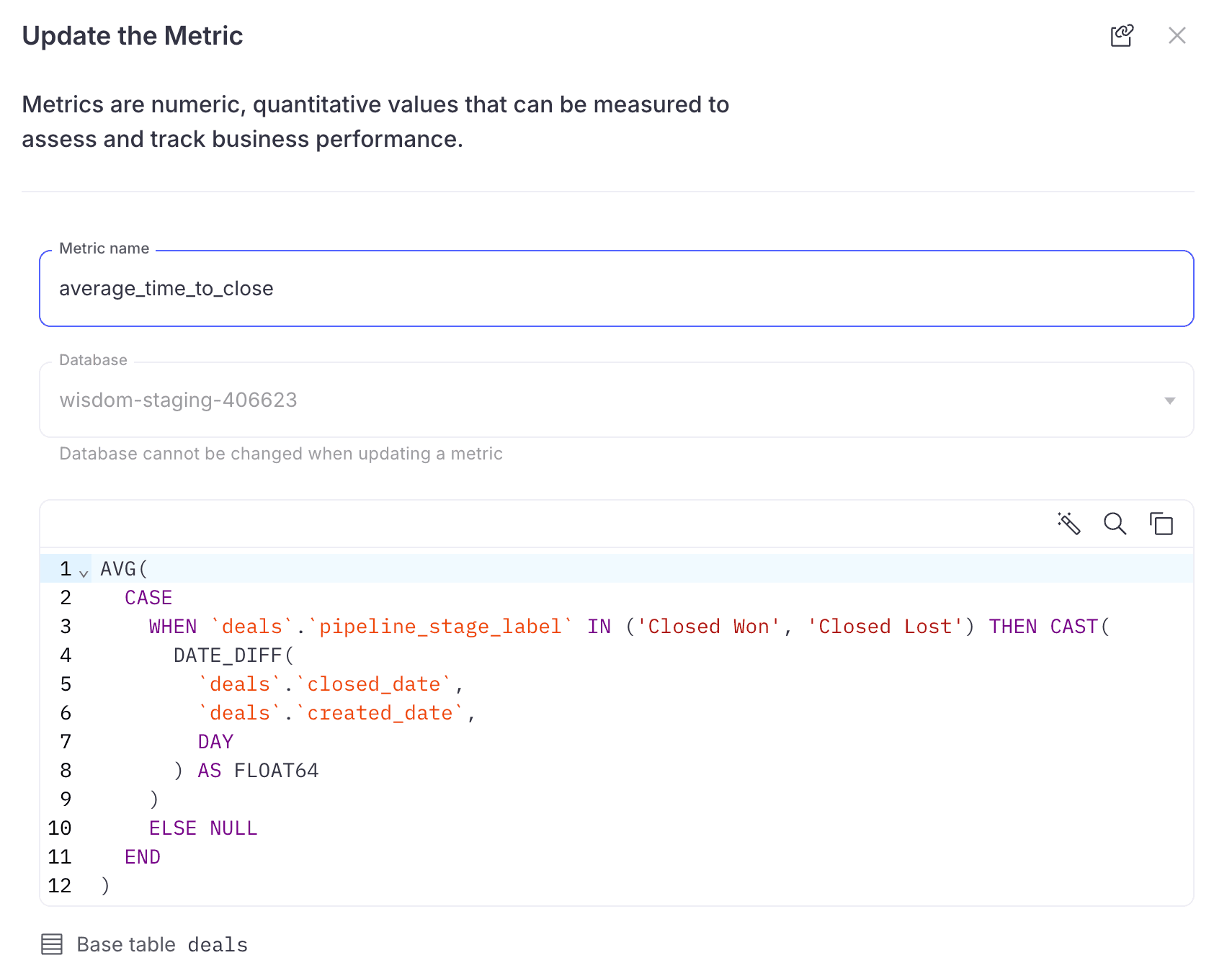
Example: Metric definition linked to datasets
Relationships: Explain how the different tables relate to each other. Establish the primary key for queries and whether there exists a 1:1/1:M/M:1/M:M relationship
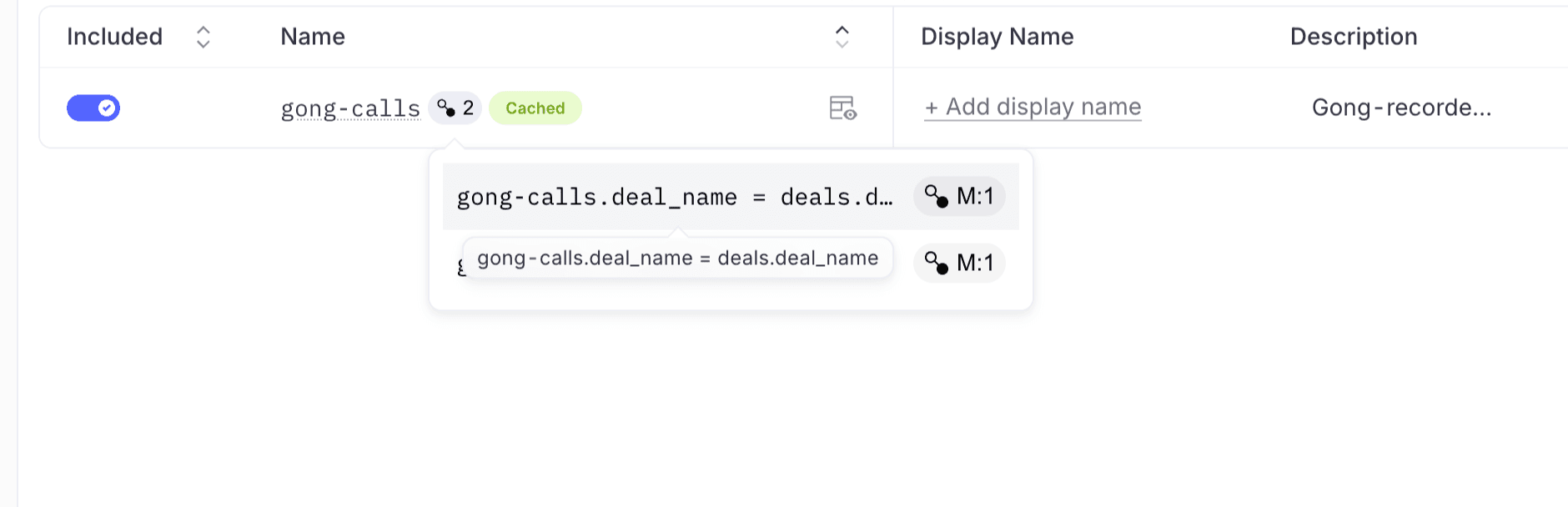
Example: Establishing relationships between different data sources
Skills: For the repeatable analysis that you intend to run on these data sets.
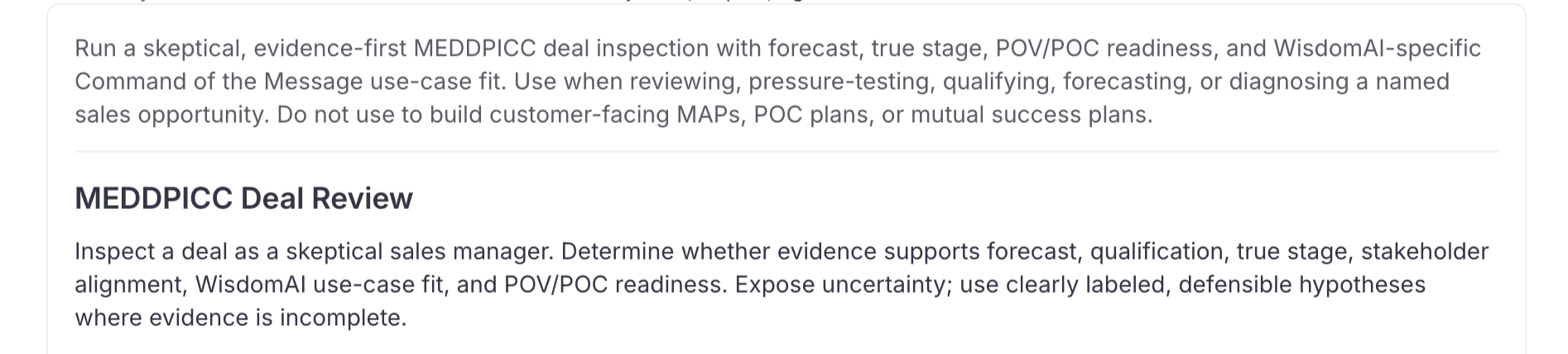
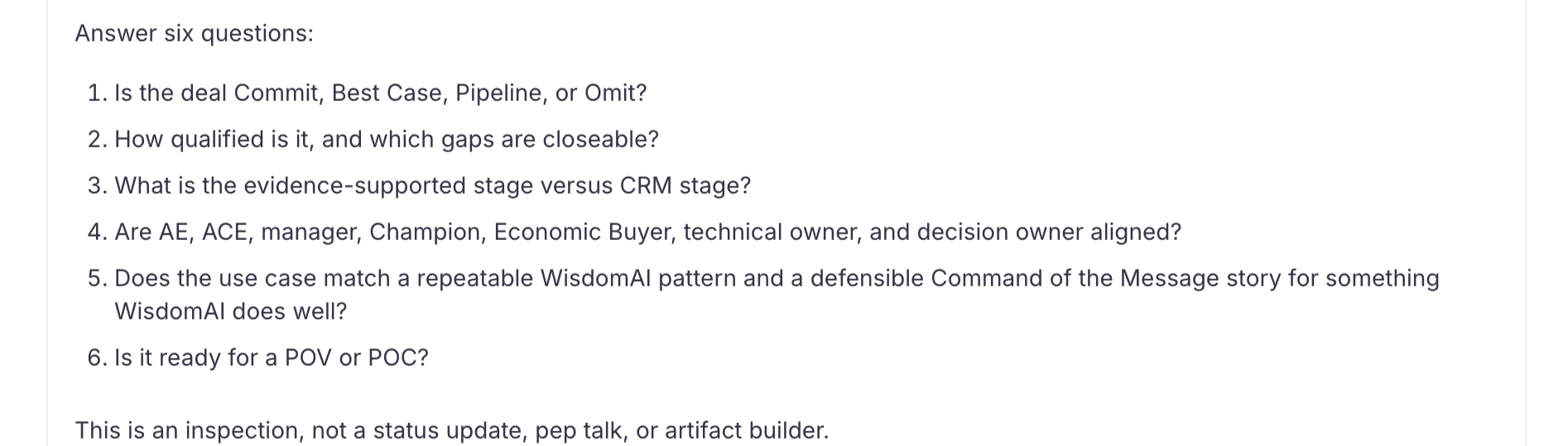
Example: Skill definition for one of my favorite skills which scores every opportunity on the MEDDPICC strength
How the GTM team uses WisdomAI today
Once the context was built, the team could simply start using it. Regardless of their analytics surface (in product or in their go-to LLM), their usage and feedback is captured in WisdomAI’s Adaptive Context engine, which heps me update and maintain the context over time. This means the data stays accurate and trusted, even as the business evolves.
Here are the analytics surfaces our team uses day-to-day:
Chat
This is the go-to tool for ad hoc insights. The answer to any GTM question or metric is readily available on WisdomAI, including questions about structured CRM data or unstructured call transcripts. Regardless of where the team asks their questions — WisdomAI, Claude, Slack — they get a contextual, governed, accurate answer with zero dependency on any individual or external system. A few obvious bottlenecks have been removed, including familiarity with a new system, tribal knowledge about the filters/definitions, and dependency on a specific team or individual. This doesn’t even account for the decreased spend on tool sprawl.
Agents
We have proactive agents that monitor pipeline activity, POC usage, and alerts for metric gaps and other issues that we need to proactively monitor. We also have reactive agents that observe deal changes, forecast stages, and other agents that automatically validate the sanctity of those changes and forecasts. With WisdomAI agents, we’re proactive instead of reactive — picking up gaps that we would not have otherwise.
Dashboards
Last but not least, we have AI-powered dashboards — the backbone of every GTM team. Creating dashboards no longer requires knowledge of SQL or design skills. I simply start a chat with Wisdom, describe the KPI, metrics, and comparisons I want to see, and at the end of a chat, I have a dashboard that I am comfortable sharing with the team. Any team member who has clarifications or follow-up questions can ask WisdomAI in the dashboard, instead of coming to me for every answer.
How I’ve used WisdomAI in the last 90 days
To wrap this up, here is a snapshot of how I used WisdomAI Chat in the last 90 days. I won’t even try to calculate the total time WisdomAI has saved me, because in reality, I wouldn’t have even known to ask more than half of these questions if it weren’t for WisdomAI and our context engine.
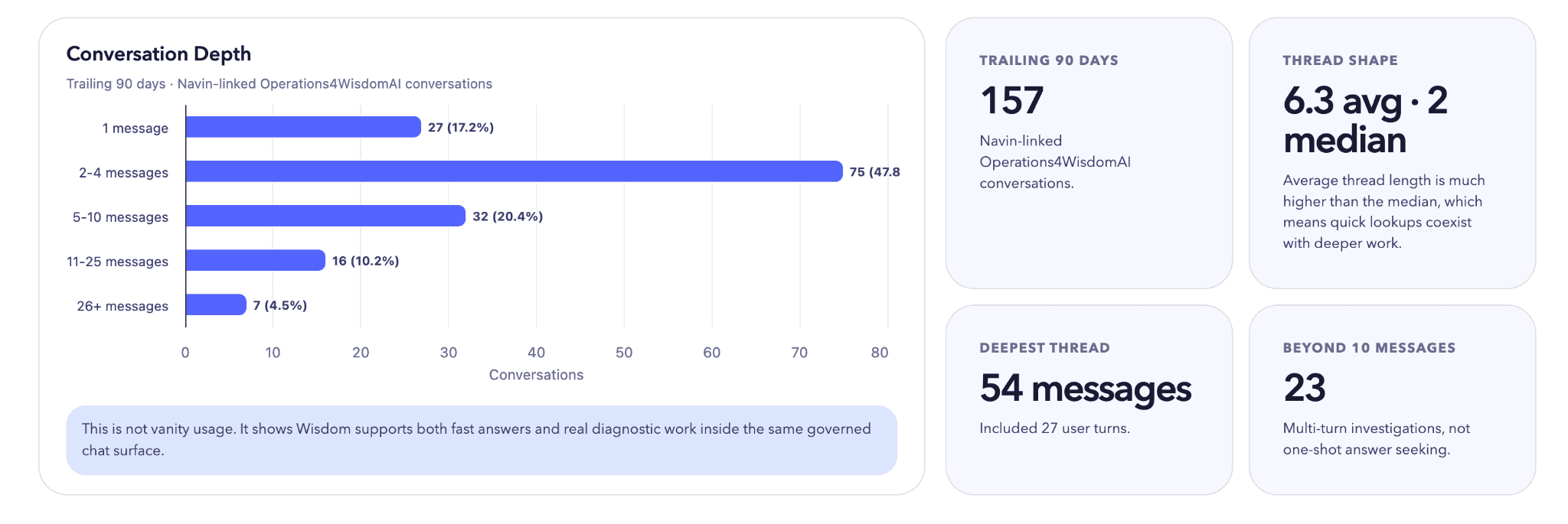
As a non-technical, one-man RevOps leader, I cannot write a single SQL query, nor can I rely on an army of analysts to help me out. WisdomAI gives me access to data in a way I’ve never had before.
There’s one number that should stand out: I had a conversation with WisdomAI that went on for 54 messages; in that conversation, I asked Wisdom 26 follow-up questions.
Imagine a world where you had an analyst at your disposal. How many follow-up questions would you have actually remembered to ask when you got your first answer a couple of days later? What context would have been lost within the 3 emails/Slack messages/meetings. WisdomAI doesn’t forget context, it gets smarter with each use. That is why it’s become such a critical tool for the GTM team.
If you’ve made it this far and enjoyed reading this article, stay tuned for the next installment coming later this month.
Until then, I’d love to compare notes. If you are building the same thing, on Wisdom or otherwise, you can write to me at navin@wisdom.ai. Or, grab some time to chat here, and I will walk you through the actual workspace.