
PUBLISHED:
UPDATED:
Snowflake spent the last few years trying to be more than a data warehouse. Cortex is a clear signal of a changing “modern data stack.” The norms that have defined the market for the initial cloud-market boom are breaking down. Snowflake is calling their bet: Intelligence should come to where the data already lives. And while that’s a reasonable argument, that doesn’t make the product an interchangeable, reliable BI solution for the enterprise. So what does Cortex actually do, what will it cost you, and is it worth the hype? Let’s find out.
What is Snowflake Cortex?
Snowflake Cortex is an AI layer that runs directly within the Snowflake Data Cloud. Instead of sending your sensitive, enterprise data to external models, the intelligence comes to where your data already lives—inside Snowflake’s governance boundary.For your data team, this eliminates the need to build and maintain new infrastructure. You can query large language models, run natural language searches, and extract structured data from documents without the usual engineering bottlenecks.
Snowflake Cortex at a glance:
Best for | Data teams that are already deeply invested in the Snowflake ecosystem. |
Not ideal for | Business users who need self-serve answers without technical support. |
Biggest strength | Everything runs inside Snowflake’s governance boundary. |
Biggest limitation | Requires significant upfront setup and ongoing maintenance before it delivers reliable value |
Platform dependency | Works only with data inside Snowflake. |
Verdict | It delivers for teams with the technical capacity to build and maintain it. For everyone else, the cost outweighs the benefit. |
There is more to unpack. Keep reading.
The Cortex suite: What each tool does
Cortex isn’t a single product. It’s a suite of tools that has grown significantly since launch. Here’s what each one does:
Snowflake Intelligence: The conversational layer
Snowflake Intelligence is the chat-style interface that sits on top of everything else. You type a question in plain English and get an answer back, whether that’s a number, a chart, or a summary. It also connects with Gmail, Salesforce, Jira, and Slack, so insights surface inside the tools you already use every day. AI-ready caution: But what it returns depends entirely on how clean and well-governed the data is. The interface can only be as good as the foundation it’s sitting on.
Cortex Analyst: Analytics on demand
Cortex Analyst is a text-to-SQL tool that translates plain English questions into queries against your Snowflake data. Once your data team builds a metadata layer that connects your business language to the actual tables and columns, you can chat with the AI data analyst to ask questions and get natural-language answers back — without writing SQL or waiting on an analyst. The tradeoff: it only answers questions SQL can resolve. If you ask something broad, complex or open-ended, the produced answer isn’t reliable enough for an enterprise to action.
Cortex Search: The search layer
Cortex Search handles vector, keyword, and semantic search in one place. Instead of matching exact words, it understands the meaning behind your query and surfaces the most relevant information — whether that lives in a document, a PDF, or a structured data source.Worth knowing upfront: Cortex Search sits at the premium end of the pricing spectrum. Factor that in before you scope a project around it.
Cortex Agents: The orchestration layer
Cortex Agents coordinate everything happening inside Snowflake Intelligence. A question comes in, the agent reads it, and routes it to the right tool.Ask something like, “What did our enterprise accounts spend last quarter and are any contracts up for renewal?” The agent splits this question into two tracks, runs them in parallel, and brings back a single response. One thing to keep in mind: the narrower the scope you give an agent, the more reliably it performs.
Cortex AI Functions: Automate the repetitive work
Cortex AI Functions let your data team run AI-powered tasks directly inside Snowflake. The function library is split into two categories:
LLM Functions: Handles everything text-related in SQL or Python, covering tasks like text generation, classification, summarization, and translation.
ML Functions: Works on structured data using SQL, surfacing patterns and flagging anomalies.
Both come with restrictions: Usage is subject to token limits, so credit consumption scales with volume, and the functions are confined to the Snowflake environment. If your data lives across multiple platforms, they won’t be of much use to you.
Cortex Code: The developer layer
Cortex Code is Snowflake’s AI coding agent for data teams. It understands your schemas, roles, and governance policies, and uses those rules to generate, debug, and optimize SQL, Python, and dbt workflows.Code restrictions: The scope is deliberately narrow, though. It is built for data engineering workflows inside Snowflake, not general-purpose coding.
How teams are using Snowflake Cortex
Turning documents into queryable, structured data
The problem with unstructured data analysis, on sources like PDFs and documents, is that the information is in there, but getting it out takes time nobody has. Cortex solves this by converting your unstructured content into structured, searchable data using SQL.Point Cortex at a document and it extracts text, tables, and layout information. Everything it finds gets converted into queryable fields inside Snowflake, ready to feed into your analytics workflows or an RAG pipeline.How this works in practice: Your legal team can type a clause or term into Cortex Search and instantly get relevant contracts for review.
Extracting specific fields to enrich your data
Parsing makes your document readable. Extraction takes it a step further. Instead of making the entire document searchable, you tell Cortex exactly which data points you need, and it returns them as structured columns directly in your Snowflake tables.Describe what you want in plain language, such as company names, dates, contract values, or clause types. Cortex pulls those fields out of the document, whether they sit in a paragraph, a table, or a checkbox.How this works in practice: A finance team processing hundreds of invoices a week stops pulling field values manually. They define what they need, Cortex extracts it, and the data lands in structured columns ready for reconciliation and reporting.
Running sentiment analysis on customer data
Your team is sitting on thousands of reviews, support tickets, and survey responses that never get fully analyzed. Cortex fixes that directly inside Snowflake. Here’s how the process works:Define the categories that matter to your business—product quality, pricing, wait time, and customer service. Cortex runs classification and sentiment scoring simultaneously, assigning each entry a category label and a sentiment score in the same pass.How this works in practice: A customer success team working through a backlog of NPS responses stops manually analyzing entries. They define categories and get back a structured breakdown showing where customers are satisfied and where the experience is falling short.
Snowflake Cortex pricing: Why estimating costs is harder than it looks
Snowflake Cortex has no fixed subscription price. Every feature bills differently, and the costs stack directly on top of your existing Snowflake compute spend.Although Snowflake has a pricing calculator, treat it as a starting point. Your actual costs depend on multiple variables, such as how many people on your team are using the platform, which AI models they pick, how often it refreshes, and so on. Cortex Search, for instance, charges an initial setup fee plus a recurring monthly fee per gigabyte to keep the vector index active. But the real budget risk lies in Cortex AI Functions and Cortex Analyst, which bill based on token consumption.These are the variables that will directly affect your bill:
Snowflake Cortex cost factor | What drives it |
Token consumption | A token is how Cortex measures and bills AI processing. Every piece of text you send in and every response you get back are counted as tokens. More text, higher bill. |
Number of users | The more people using Cortex across your org, the higher the baseline token consumption. |
AI model selection | Lighter models cost significantly less than frontier models for the same task. |
Virtual warehouse compute | Several Cortex features consume warehouse compute on top of AI credits. Warehouse size and query complexity both determine how much. |
Refresh frequency | How often your data indexes are refreshed determines how much computing runs in the background. |
Getting full visibility into Snowflake Cortex pricing is a real investment of time. It’s also the only way to know what you’re actually signing up for.
Evaluating Snowflake Cortex: Strengths and trade-offs
Cortex delivers on some of its promises. But it was never designed to replace every AI tool in your stack. The moment your use case steps outside the Snowflake boundary, you’re back to building something else. And every tool you add brings another billing layer with it.Here is how the experience actually breaks down:
What Cortex gets right:
Snowflake Cortex Strengths | What this means for your team |
Everything stays inside Snowflake | If your data is already centralized in Snowflake, Cortex reduces integration overhead compared with assembling separate AI components. |
Flexibility for technical teams | Engineers and analysts can build custom agents, workflows, and analytics tailored to your specific use cases. If your data model is complex, this control matters. |
Natural language querying | Snowflake Intelligence enables your business users to ask questions in plain English and get answers without writing SQL. |
Where Cortex struggles:
Snowflake Cortex Limitations | What this means for your team |
Needs significant groundwork | Your data team must invest heavy engineering hours to define business metrics, map relationships, and maintain the semantic layer. |
No true self-service analytics | Vague or new questions require your data team to build new data models. Analysts still have to verify outputs and fill gaps. |
Unpredictable costs | Pricing is usage-based with no fixed ceiling, so costs can climb significantly before you even notice. |
AI in the warehouse. Answers still in the queue.
Snowflake Cortex was built for teams where the data team fields every question. A business user asks something new, the semantic layer gets updated, an output gets verified, and a report gets assembled. By the time that cycle completes, the decision has already been made. And that is before you hit the platform boundary. Cortex only sees what lives inside Snowflake. If your stack is hybrid, every answer you get is already missing part of the picture.WisdomAI’s Agentic Analytics skips the queue entirely. Business users get answers. Data teams get their time back.
How WisdomAI works
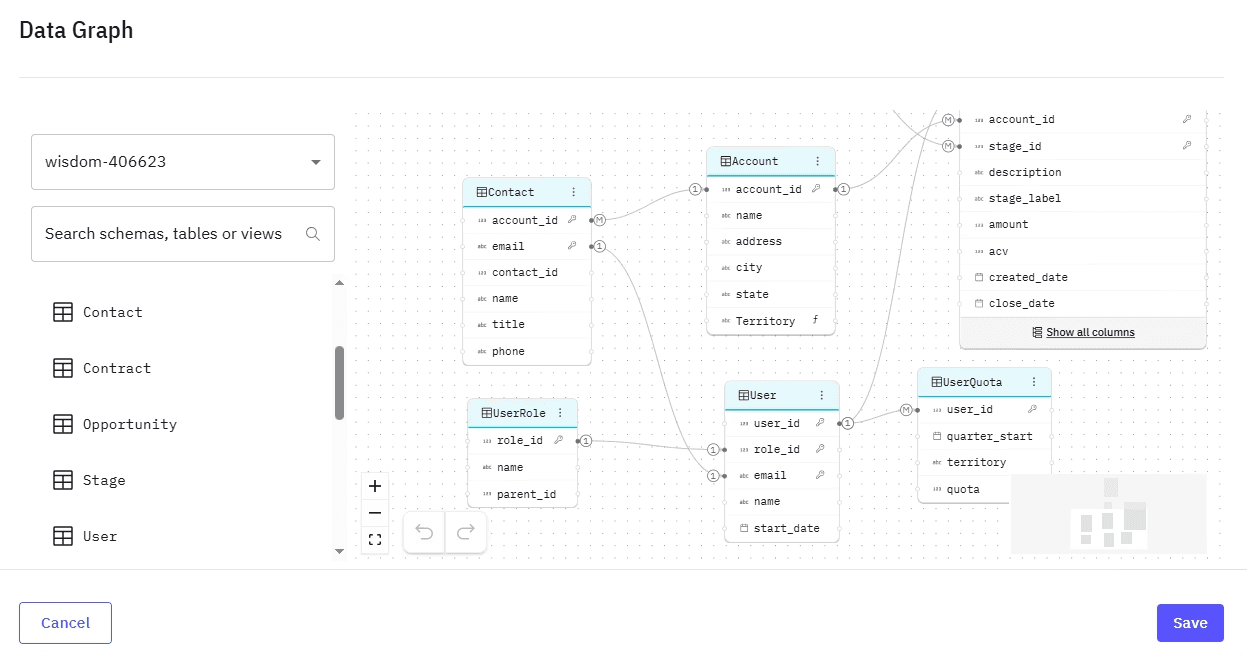
Data Domains: Clean, contextualized data for analysis
WisdomAI connects across your entire data architecture rather than forcing you to build separate models for each platform. Your key metrics and context are standardized, stored, and continuously updated by the Adaptive Context Engine. That enterprise context can then be applied anywhere — in WisdomAI, business tools, like slack, that deploy WisdomAI intelligence, and even in apps that connect to WisdomAI using MCP tools. This means, every interaction is federated, reliable, and contextual to your role in your organization.
Analytics Agents: Insights delivered automatically
Ask a question, follow up, and keep drilling down into your data until you get to a decision. In WisdomAI, every answer comes back inside the tools your team already uses. The agents don’t guess how to calculate a metric—they retrieve the exact governed definition you established. That’s why most enterprise teams see accuracy above 95%.
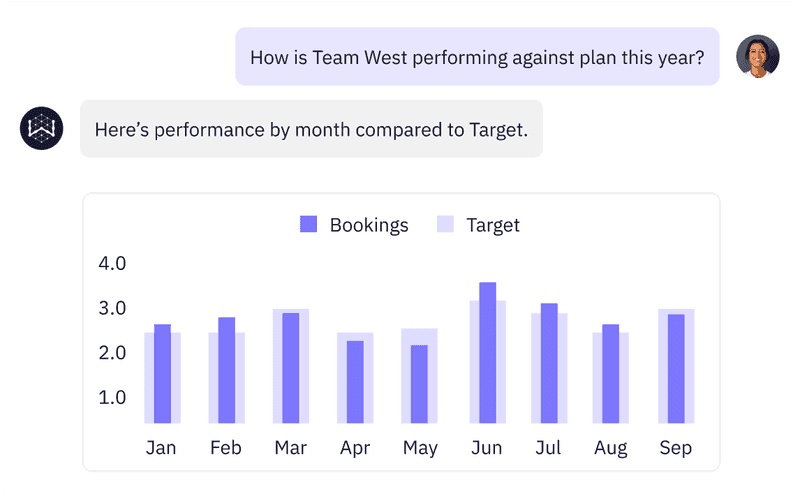
The result: Your data team gets to focus on work that actually moves the needle. Your business users stop waiting. And your insights are no longer locked by a single platform’s boundary.Cortex lets data team build and deliver faster insights. WisdomAI empowers everyone in your business to find answers, and confidently act on their data. See the difference for yourself.
FEATURED RESOURCES

Embedded Analytics Tools: A Buyer’s Guide for 2026
Tools
Embedded Analytics Tools: A Buyer’s Guide for 2026
BI Tools Comparison: AI Capabilities and Features Comparison
Tools
BI Tools Comparison: AI Capabilities and Features Comparison
Looker vs Tableau in the Generative AI Era
Tools